Todoist alternative? Start with what it is not doing
todoist alternative10 min read
Looking for a Todoist alternative? Decide first whether you need deadlines, hours and feasibility. If so, another list will not fix it.
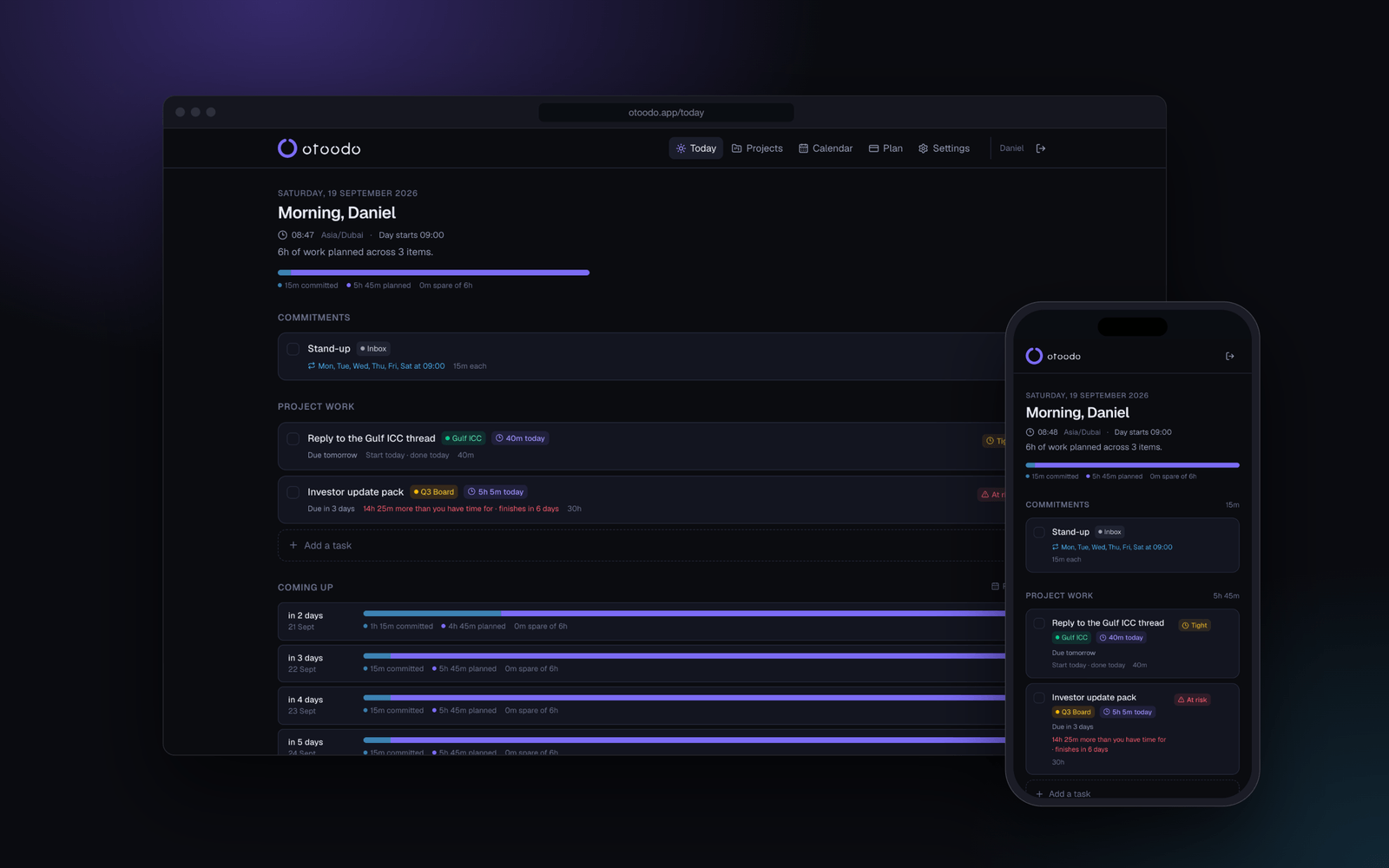
A todoist alternative is not the first question. The first question is what Todoist is not doing for you. If the problem is capture, recurring tasks, and a clean list, you may not need to move. If the problem is that Friday keeps arriving with work still sitting in the week, another list will not save it.
That sounds blunt because it is blunt. A list can sort work. It cannot tell you whether the work fits the hours you actually have, or whether a deadline is already impossible in arithmetic terms.
The short version
- If you want better capture, recurrence, and a tidy list, Todoist may still be enough.
- If you need to know whether the week fits, you need hours, not just priorities.
- A real alternative for deadline pressure must show a shortfall in hours, not just a red flag.
- If you are choosing a Todoist alternative, start with your failure mode, not the logo.
Todoist is good at lists. Lists are not the same as capacity
There is no point pretending Todoist is bad at being a task app. It is good at the work it is built to do. You capture tasks, mark them recurring, and keep them moving through the week. That is useful.
The trouble starts when the question changes. Once you are asking, “Can I actually finish this by Friday?” the list shape is no longer the problem. The problem is capacity. You have a fixed number of focused hours each day, and the work has to fit inside them.
That is where people start rebuilding spreadsheets. They copy tasks into columns, subtract the obvious meetings, and hope the result looks manageable. It usually looks manageable until the week starts and the maths catches up.
If you want the arithmetic version of that check, use the interactive calculator. It asks for hours a day, days to the deadline, and hours of work, then tells you whether it fits.
The real question: what is missing from your current setup?
A Todoist alternative only matters if the missing piece is structural. If you need capture on the move, recurring reminders, and a reliable inbox, that is one thing. If you need feasibility, that is another.
Here is a simple way to separate the two.
What deadline pressure looks like in numbers
The easiest way to see the gap is to work the numbers. Suppose you have a small client job due on Friday. You have 6 focused hours available each weekday, and Monday is already partly consumed by recurring commitments. The job needs 18 hours of work.
A task list can show the task. It cannot show the arithmetic. The arithmetic is the point.
The weakness of the argument: estimates are wrong
This is where the neat arithmetic meets reality. Estimates are wrong. Some work takes 40 minutes. Some work takes 4 hours. Some work cannot be split cleanly across days because it depends on one uninterrupted block or on a client reply that does not arrive when you would like.
That does not make capacity planning useless. It makes it honest.
A good planner does not pretend the estimate is perfect. It uses the estimate as the best available number and then shows what fits. If the estimate is rough, the output is rough. That is still better than no output at all.
There is another limit. Some tasks cannot be spread evenly. A presentation deck may need a long final pass. A proposal may need a late-stage review. A list can hold that as text. It cannot tell you whether the runway is wide enough for the remaining work.
What to look for in a Todoist alternative
If you are searching for a todoist alternative, start with the questions below. They will tell you whether you need a new list, or a different kind of planner entirely.
A worked example: one week, one deadline, one shortfall
Suppose you are a consultant with three pieces of work due by Thursday evening.
- A proposal draft, estimated at 6 hours
- A slide deck refresh, estimated at 5 hours
- A client summary, estimated at 4 hours
You have 5 focused hours per day on Monday, Tuesday, Wednesday, and Thursday. That is 20 hours in total. But you already have 3 hours of recurring commitments across those days, so your usable capacity is 17 hours.
When a plain list is still the right answer
It would be dishonest to claim every reader needs a deadline-aware planner. Some people do not live by client dates. Some people have light, recurring work and few hard commitments. Some people want a better capture system, and nothing more.
A plain list is fine when:
- your deadlines are soft
- you are not paid to hit dates
- you do not need to convert work into hours
- you are happy to manage capacity in your head or in a spreadsheet
That is not an insult. It is a boundary.
The mistake is buying more structure than you need, or less structure than your work requires. If the work is deadline-driven, the question is not whether the list feels nice. It is whether it can tell you what today has to contain.
How to choose without pretending the names matter
The market loves labels. Task app, productivity app, planner, note system, workspace. None of those words tell you whether the thing can do the job.
A better filter is plain:
- Can it hold tasks and recurrence without friction
- Can it work in hours, not just in labels
- Can it say when a deadline is impossible
- Can it spread work instead of shoving it late
- Can it deal with the fact that your capacity changes on some days
If the answer to the first is yes and the rest are no, you are still shopping for a list. If the answer to the first four is yes, you are shopping for a planner that does arithmetic.
A fair comparison with other tools
If you are comparing options, the honest question is not “which app has the most features”. It is “which one matches the way I actually work”.
FAQ
Is Todoist still enough for freelancers?
Sometimes. If you mainly need a clean place to collect tasks, repeat them, and move them through the week, it may be enough. The moment you need to know whether a deadline fits inside the hours you actually have, you need more than a list.
What is the main difference between a list and a deadline-aware planner?
A list tells you what exists. A deadline-aware planner tells you whether the work fits, how it spreads across the remaining days, and how many hours short you are if it does not. That is the difference between organising work and measuring feasibility.
Do I have to estimate everything perfectly?
No. Rough estimates are enough for the arithmetic to be useful. If your numbers are approximate, the result is approximate too, but that is still better than guessing with no capacity model at all.
What if some of my work cannot be spread evenly?
Then you need a planner that can still show the runway, not just the pile. Some tasks need a block of time near the end. Some need to be started early. A capacity-aware plan still helps you see whether that is possible before the deadline arrives.
When should I stop using a plain to-do list?
When your real problem is no longer remembering tasks, but judging whether the week fits. If you keep discovering on Friday that the work never had enough hours in it, the list is not the missing piece.
If you want a tool that measures capacity instead of just sorting tasks, start with otoodo and check whether your current week actually fits. The home calculator gives you the arithmetic first, and the product gives you the same discipline across the whole planner. Fourteen days free, no card.